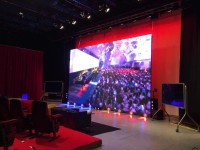
This product worked very well for us as video display at an live on-stage event. Since the event did not have the budget to support usual large LED wall, this product was well suited. We showed one image across two units using the "mosaic" function. It might be useful to know that sending such video from computer is a bit more complicated than from smartphone. To send image from computer as mosaic, the application ViPlex Express needs to be downloaded and installed on Windows PC. (Sending images from PC is more common when used at event since precise and reliable timing is usually needed.) In the case of using 2 or 3 units positioned together as one screen, a non-standard resolution is called for. Hence, the media to be shown needs to be produced at such non-standard resolution. As Panda is unable to provide detailed instructions, I would recommend allowing plenty of advance rental time to accomplish this.
A technical detail I did not understand at first is that each unit has a Novatek Taurus T40 screen controller attached to the rear. When using more than one together, the first T40 is connected to the source and then the other screens are connected in HDMI from one to the next.
I purchased a 50m optical HDMI cable for connecting source computer (Mac) to the LED. Panda has a 45m optical HDMI that should work, but I chose to buy one in order to know the exact specification. This is because sending the non-standard resolution needs very proper communication between T40 and computer.
Overall, I would recommend this product for live event use in situations where there is not budget enough for usual large LED wall.
Currently, Panda has 3 units. It would be great to see one additional available as using 4 together would be close to the usual 16:9 shape that works as a background for presenters on-stage.


















![屋外用 デジタル サイネージハウス(エアコン付)[東京近郊の配送・設置撤去込み]](/html/upload/thumbnail/0117144405_65a76925da7c0.png.webp)


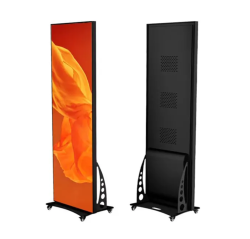














本製品は、ライブステージイベントにおける映像表示として非常に効果的でした。通常の大型LEDウォールを設置する予算がなかったため、本製品が最適でした。「モザイク」機能を活用し、2台のユニットにまたがる1つの映像を表示しました。なお、スマートフォンからよりも、コンピューターからこのような映像を送信する方がやや複雑になる点をご参考までに申し上げます。コンピューターからモザイク画像を送るには、Windows PCにアプリケーション「ViPlex Express」をダウンロードしてインストールする必要があります。(イベントでの使用時は、正確で信頼性の高いタイミングが求められるため、PCからの画像送信が一般的です。)2台または3台を1つの画面として配置する場合、非標準の解像度が必要となります。そのため、表示するメディアは、その非標準解像度で作成する必要があります。パンダ社では詳細な手順をご提供できませんので、この作業を完了させるため、レンタル期間を十分に前倒しされることをお勧めいたします。
当初理解できなかった技術的な詳細として、各ユニットの背面にはNovatek Taurus T40スクリーンコントローラーが取り付けられています。複数台を連携して使用する場合、最初のT40をソースに接続し、その後、他のスクリーンをHDMIで順次接続していく仕組みとなっております。
私はソースコンピュータ(Mac)とLEDを接続するため、50mの光HDMIケーブルを購入しました。パンダ社製45m光HDMIケーブルでも動作するはずですが、正確な仕様を把握したく購入しました。非標準解像度を送信するには、T40とコンピュータ間の通信が極めて正確である必要があるためです。
総じて、通常の大型LEDウォールを導入する予算が確保できない状況でのライブイベント用途には、本製品をお勧めいたします。
現在、パンダ社は3台を所有しております。4台を併用すればステージ上のプレゼンター用背景として最適な標準的な16:9形状に近くなるため、追加で1台が利用可能となれば大変有益かと存じます。
This product worked very well for us as video display at an live on-stage event. Since the event did not have the budget to support usual large LED wall, this product was well suited. We showed one image across two units using the "mosaic" function. It might be useful to know that sending such video from computer is a bit more complicated than from smartphone. To send image from computer as mosaic, the application ViPlex Express needs to be downloaded and installed on Windows PC. (Sending images from PC is more common when used at event since precise and reliable timing is usually needed.) In the case of using 2 or 3 units positioned together as one screen, a non-standard resolution is called for. Hence, the media to be shown needs to be produced at such non-standard resolution. As Panda is unable to provide detailed instructions, I would recommend allowing plenty of advance rental time to accomplish this.
A technical detail I did not understand at first is that each unit has a Novatek Taurus T40 screen controller attached to the rear. When using more than one together, the first T40 is connected to the source and then the other screens are connected in HDMI from one to the next.
I purchased a 50m optical HDMI cable for connecting source computer (Mac) to the LED. Panda has a 45m optical HDMI that should work, but I chose to buy one in order to know the exact specification. This is because sending the non-standard resolution needs very proper communication between T40 and computer.
Overall, I would recommend this product for live event use in situations where there is not budget enough for usual large LED wall.
Currently, Panda has 3 units. It would be great to see one additional available as using 4 together would be close to the usual 16:9 shape that works as a background for presenters on-stage.
パンダスタジオレンタルをご利用いただきありがとうございます。
屋内用COB LED ポスターインフォメーションディスプレイ(TC-YP1.2型)をご利用いただいた際の、非常に詳細で専門的なレビューをお寄せいただき、心より御礼申し上げます。
「通常の大型LEDウォールを設置する予算がない中で最適な選択だった」とのご評価、また「モザイク機能による2台連携表示の成功」など、実際の運用に即したご体験を共有いただけたことは、他のお客様にとっても大変参考になる内容です。
PCからの映像送信における「ViPlex Express」導入の必要性、非標準解像度での素材準備、Taurus T40の接続手順に関する具体的な技術的アドバイスなど、現場でのご対応力と洞察に深く敬意を表します。
また、「レンタル期間は余裕をもって準備されることを推奨」というお言葉も非常に重要なご提案であり、今後のご案内にも活かさせていただきます。
さらに、「4台あれば16:9に近い構成が可能」とのご提案についても、今後の導入検討にあたって貴重なご意見として社内で共有させていただきます。
このたびは貴重な知見とご経験を詳細にお寄せいただき、誠にありがとうございました。
今後ともどうぞよろしくお願いいたします。