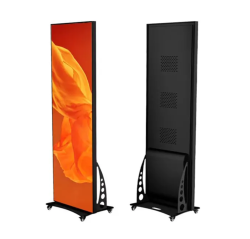
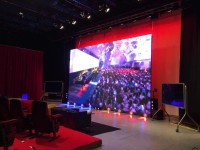
This product worked very well for us as video display at an live on-stage event. Since the event did not have the budget to support usual large LED wall, this product was well suited. We showed one image across two units using the "mosaic" function. It might be useful to know that sending such video from computer is a bit more complicated than from smartphone. To send image from computer as mosaic, the application ViPlex Express needs to be downloaded and installed on Windows PC. (Sending images from PC is more common when used at event since precise and reliable timing is usually needed.) In the case of using 2 or 3 units positioned together as one screen, a non-standard resolution is called for. Hence, the media to be shown needs to be produced at such non-standard resolution. As Panda is unable to provide detailed instructions, I would recommend allowing plenty of advance rental time to accomplish this.
A technical detail I did not understand at first is that each unit has a Novatek Taurus T40 screen controller attached to the rear. When using more than one together, the first T40 is connected to the source and then the other screens are connected in HDMI from one to the next.
I purchased a 50m optical HDMI cable for connecting source computer (Mac) to the LED. Panda has a 45m optical HDMI that should work, but I chose to buy one in order to know the exact specification. This is because sending the non-standard resolution needs very proper communication between T40 and computer.
Overall, I would recommend this product for live event use in situations where there is not budget enough for usual large LED wall.
Currently, Panda has 3 units. It would be great to see one additional available as using 4 together would be close to the usual 16:9 shape that works as a background for presenters on-stage.






 3.0 ★★★☆☆ゼネ
 5.0 ★★★★★低予算で実現可能なLED壁面 - Budget-friendly LED wall on-stage
 5.0 ★★★★★初利用
 YouTube
 X
X TikTok










出力の変換コードも付けて欲しい